Online PCB price calculator: how it works, step by step
Every section of the PCB-ELECTRA calculator explained with screenshots: what to select, what each option means and how it changes the price.
What the calculator does
The price calculator gives an instant price in euro for a printed circuit board, from 1 piece. You describe the board in a few sections, and the price, the total area and the delivery time update as you click. You do not need an account to use it, and your files are analysed in your browser: they reach us only when you send a quote request.
The screenshots below show an example configuration (25 boards of 100 × 80 mm). The prices in them are only an illustration; the calculator always shows the current ones.
1. Upload your files, quantity and dimensions
You can start without files and type the quantity and the board size in millimetres. Or drop your Gerber and drill files (or one ZIP or RAR archive) on the upload area: the calculator reads them in your browser, shows a preview and fills in what it finds, such as the board size, the number of copper layers, the thinnest track (which suggests the precision class), a panel drawn in the files and whether the outline needs milling. Everything it fills in can be changed, and the “File check” list tells you what it found or missed, for example a missing drill file.
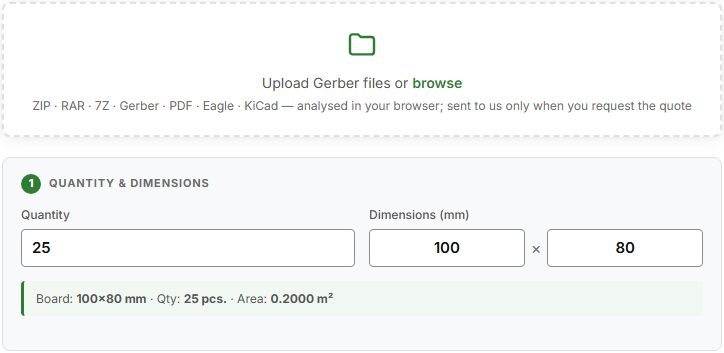
If the files and the numbers disagree, our engineers check them before the official offer. Preparing the files well saves time: see the Gerber files guide and the DFM checklist.
2. Material and layers
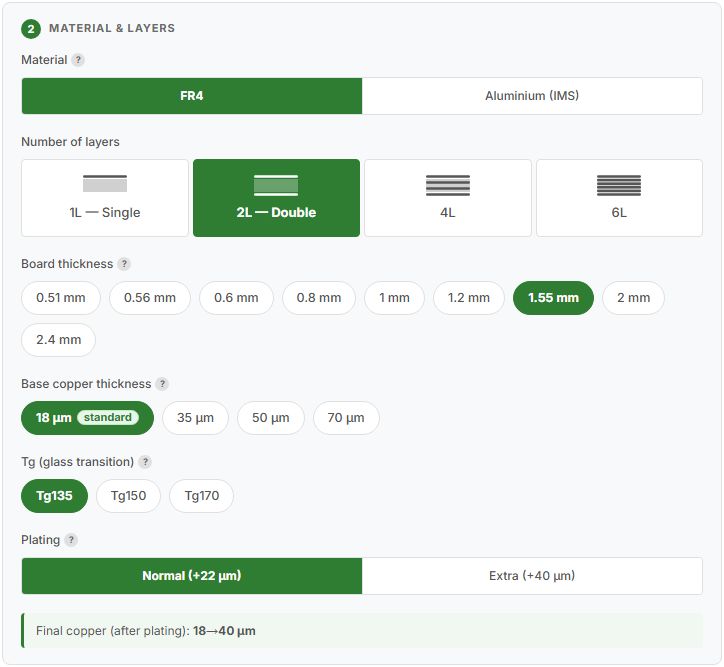
- Material. FR4 is the standard glass-epoxy board. Aluminium (IMS) is a single-layer board on an aluminium base, for LEDs and power circuits (FR4 or aluminium).
- Number of layers. 1L, 2L, 4L or 6L for FR4; aluminium is always one layer. More layers cost more, so choose the smallest number your design needs (how many layers).
- Board thickness. From 0.51 to 2.4 mm. If you have no special requirement, keep the default (standard thickness).
- Base copper thickness. 18, 35, 50 or 70 µm before plating. Thicker copper carries more current and needs wider tracks (copper thickness).
- Tg (glass transition). Tg135 is the standard laminate; Tg150 and Tg170 resist heat better and are offered only for some thickness and copper combinations, so the unavailable ones are greyed out (FR4 and Tg).
- Plating. On double-sided and multilayer boards the holes are copper-plated. “Normal” adds about 22 µm; “Extra” about 40 µm for more current capacity. The line “Final copper” shows the result.
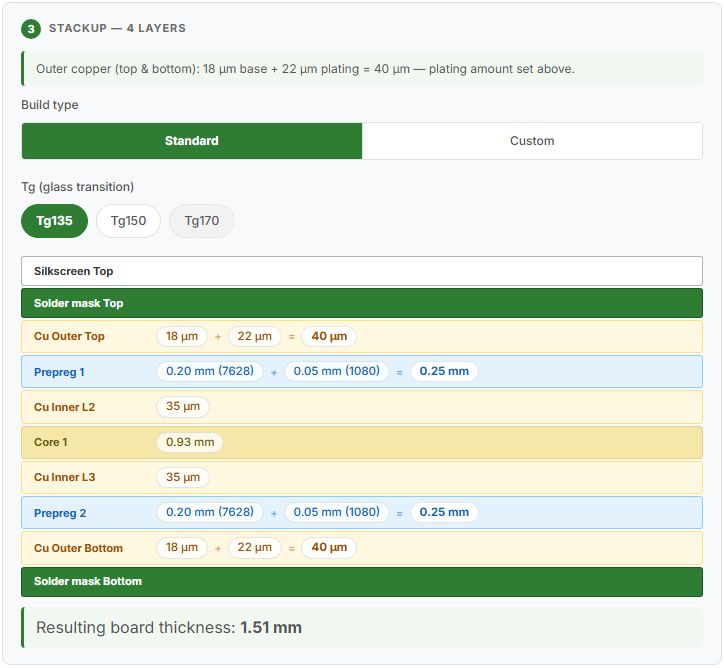
From 4 layers a stack-up section appears. “Standard” gives the usual build; “Custom” lets you choose the copper, prepreg and core on each layer, and it shows the resulting board thickness.
3. Solder mask and silkscreen
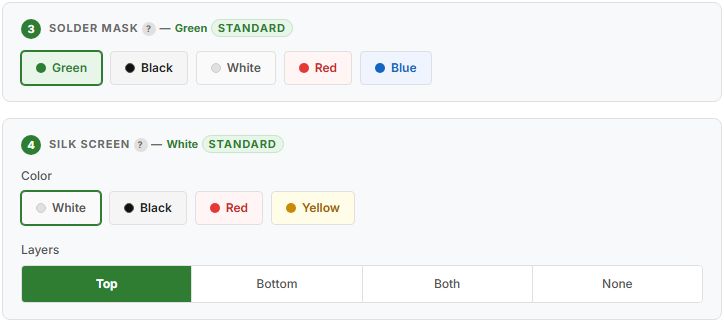
- Solder mask is the coloured protective coating. Green is the standard; black, white, red and blue are also available. A non-standard colour is priced at its own rate.
- Silkscreen is the printed legend. White is standard on FR4 and black on aluminium; red and yellow are also available. Choose the sides: top, bottom, both or none.
More in solder mask and silkscreen. A cross-section of the board with all the layers you chose is drawn below the two sections.
4. Delivery method and client panel
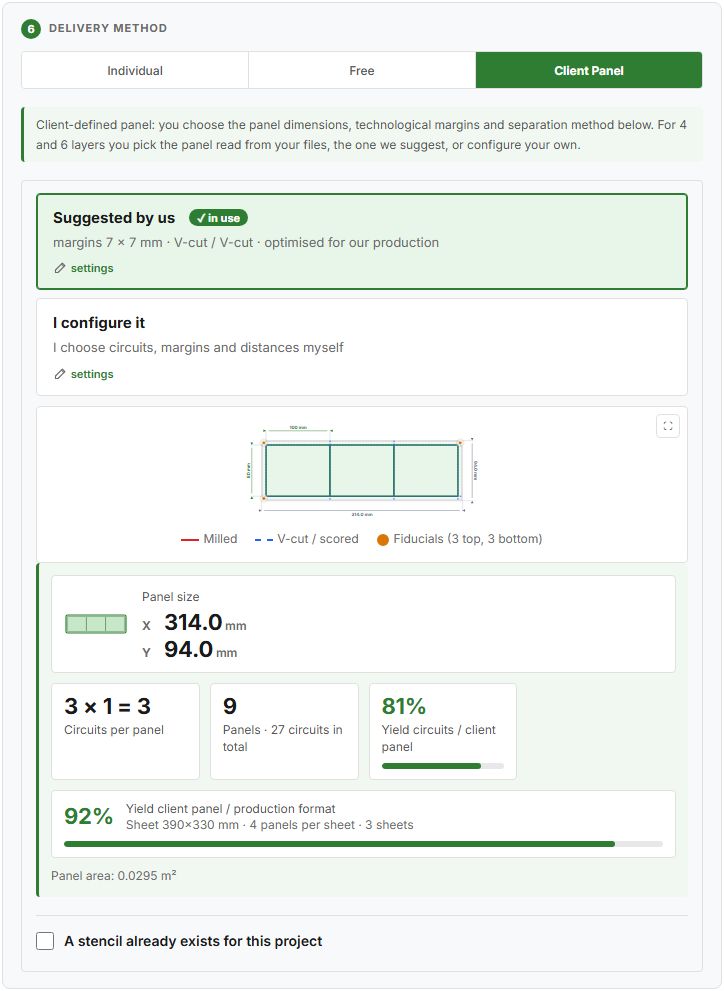
- Individual. Each board is shipped on its own.
- Free. We decide: the boards may be grouped on a panel without technological margins, separated by V-cut.
- Client Panel. You define the panel. Choose the panel suggested by us, which is built to fit our production sheet and lowers the price, or configure your own: number of circuits, technological margins, V-cut or milling, and the distance between circuits. If your files already contain a panel, it is offered as the “imported panel”.
The drawing shows the panel with its separation lines, and two figures show how well it is used: the yield of the circuits in the panel and the yield of the panel on our production sheet. A panel that fits the sheet badly costs more, so these figures help you compare options. Margins of 0 mm are allowed. See panelisation for the rules.
If the outline of the board is not a plain rectangle, or the drill file contains slots, the calculator also selects Circuit routing: “initial” for metalised slots, “final” for the outline and cut-outs.
5. Special processes
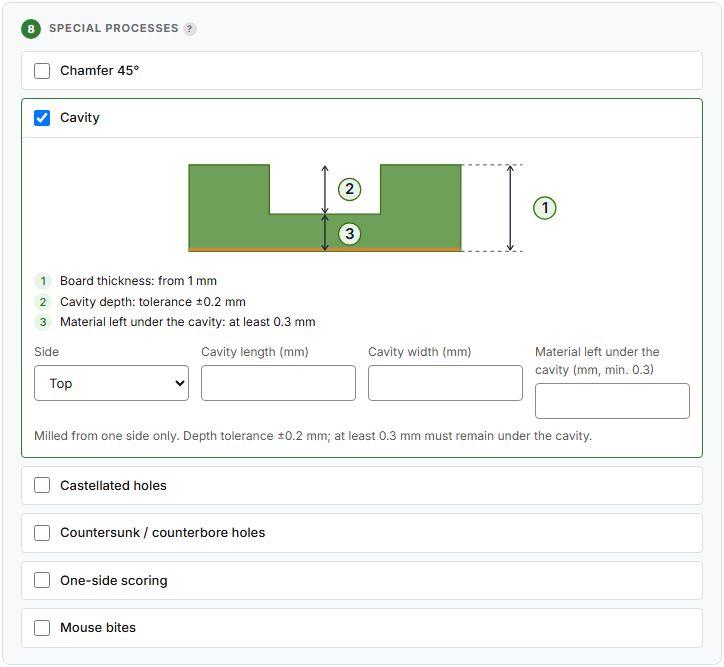
Optional processes for non-standard boards: chamfer 45°, cavity, castellated holes, countersunk or counterbore holes, one-side scoring and mouse bites. Tick one to see a drawing and enter its details; they are sent with your request and confirmed in the offer. Read special processes before you choose.
6. Surface finish, technical parameters and testing
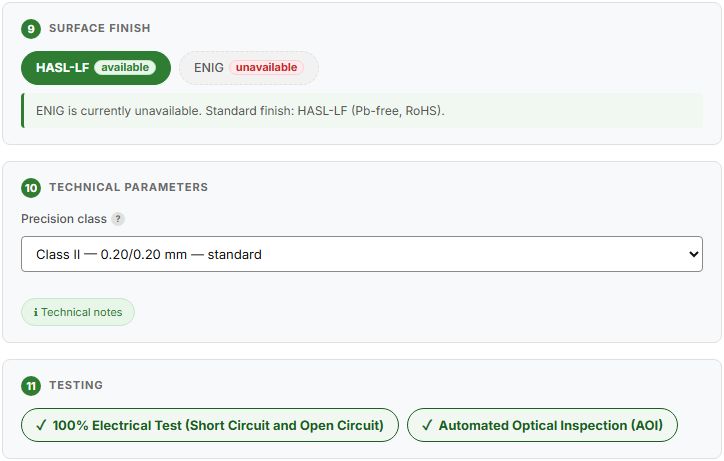
- Surface finish. Lead-free HASL (HASL-LF), RoHS compliant, is the standard. ENIG is currently unavailable.
- Precision class. II (0.20/0.20 mm track and gap) is standard; III, IV and V go down to 0.12/0.12 mm for finer designs. If you upload files, the calculator proposes the class that fits the thinnest track it finds.
- Testing. The 100% electrical test (short circuit and open circuit) and the AOI inspection are included for every board. See electrical test and AOI.
- Certification. The circuits are RoHS compliant; you can ask for the RoHS logo on the board and for a RoHS certificate by e-mail. Controlled impedance is not offered at the moment.
7. Production time, destination and shipping
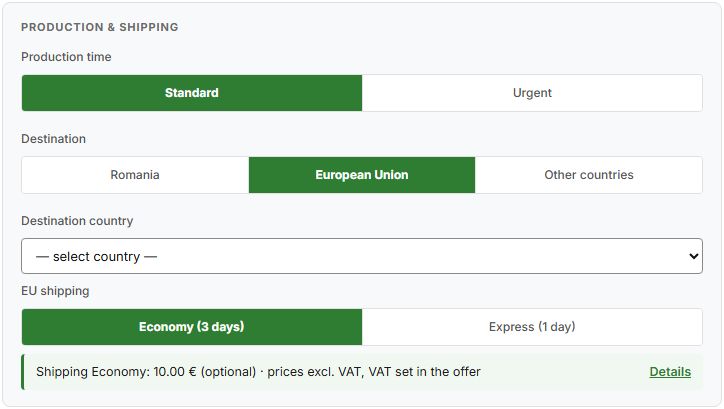
- Production time. Standard is 9 business days and urgent 6 for single- and double-layer boards and aluminium; multilayer boards take 11 and 7 (lead time).
- Destination. Romania, the European Union or other countries. For the EU you choose Economy (3 days) or Express (1 day) transport. For other countries shipping is quoted in the offer, or you collect the goods Ex Works.
- Shipping is optional and is shown separately from the price of the boards.
8. Reading the price
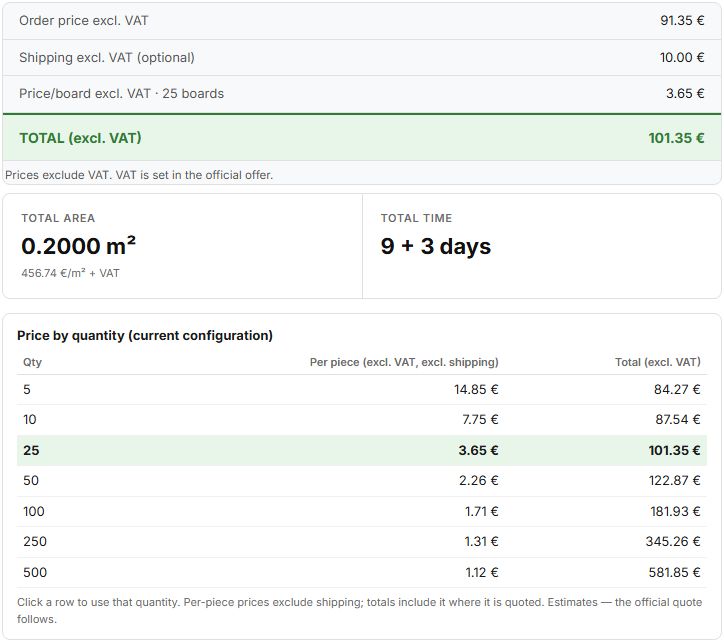
- Order price is the price of the boards, without VAT. VAT is set in the official offer according to your country and VAT number.
- Shipping is added only if you keep it.
- Price per board falls as the quantity grows, because setup and sheet use are shared.
- Total area is the area the price is calculated on, and Total time is production plus transport.
- Price by quantity shows the same board at other quantities; click a row to use it. See what sets the price of a PCB.
The calculator also has a field for a promo code. The button “Copy link to this configuration” makes a link that keeps your choices, but not your files, so you can show the setup to a colleague.
9. From estimate to offer
When the setup is right, use “Request the final quote”: add the circuit name, your e-mail and the company details, tick the acceptance box and send. You can add notes, such as special requirements. An engineer reviews the files and the configuration, and the official offer follows within 1 business day. You can download the quote PDF after sending.
With a free account the request is linked to it: you follow the status, see the documents and repeat an order from the client portal. Without an account the request still works, but the PDF is not sent by e-mail (download it right away) and you cannot follow the status online. More in how to order PCBs and instant price without an account.
Frequently asked questions
Do I need an account to use the PCB price calculator?
No. You can configure the board, see the price and send a quote request without an account. An account lets you follow the request and keep your documents.
Does the calculator include VAT and shipping?
No. The order price is shown without VAT, and shipping is optional and shown separately. VAT is set in the official offer.
Are my Gerber files sent to you when I upload them?
No. The files are analysed in your browser and are sent to us only when you send a quote request.
Can I change what the calculator fills in from my files?
Yes. Every value read from the files, such as the number of layers, the board size, the precision class or the panel, can be corrected by hand.
How accurate is the instant price?
It is an automatic estimate. The official offer, confirmed by our engineers after they check the files, is the price that counts.
Browse the questions and answers →
Upload your files and see the price
Add your Gerber files in the calculator: you see the board, the options and an instant price in euros.
Upload files in the calculator →Ask an engineer
Not sure what applies to your board? Describe it in a few lines and our engineers will advise you.